One session, start to signed-off note.
Steps 1 to 3 show the real app — actual screenshots, not illustrations. This is the whole loop: tap during therapy, and walk out with the note already drafted.
Collect with one thumb, during the session
Big ✓ and ✗ targets sized for a busy therapy room — no squinting, no scrolling mid-trial. Swipe between the kids in a group, tap to switch which goal you’re taking data on, and mark cued trials separately so the numbers stay honest.
The progress graph builds itself
Every trial lands on the graph as you tap — baseline, target line, and today, per goal. There is no “enter your data later” step, because the data was already entered when you tapped it.
The note drafts itself from YOUR numbers
The Objective and Assessment come straight from the trials you collected — 6/10, 60%, below the 80% target, compared against the baseline. Cited, never invented. Prefer to talk it out? Brain Dump gives you 60 seconds of speech instead, and the audio is discarded the moment it is transcribed.

Or just text Ollie
Short on time? Text Ollie, your personal SLP agent. Ask him to “draft my notes from my sessions today with Maya, Jonah and Leo,” and he pulls each child’s data from the steps above, drafts one note per kid in your own format, and flags any number he couldn’t find in your data. He preps your IEP meetings and helps plan next week’s sessions the same way.
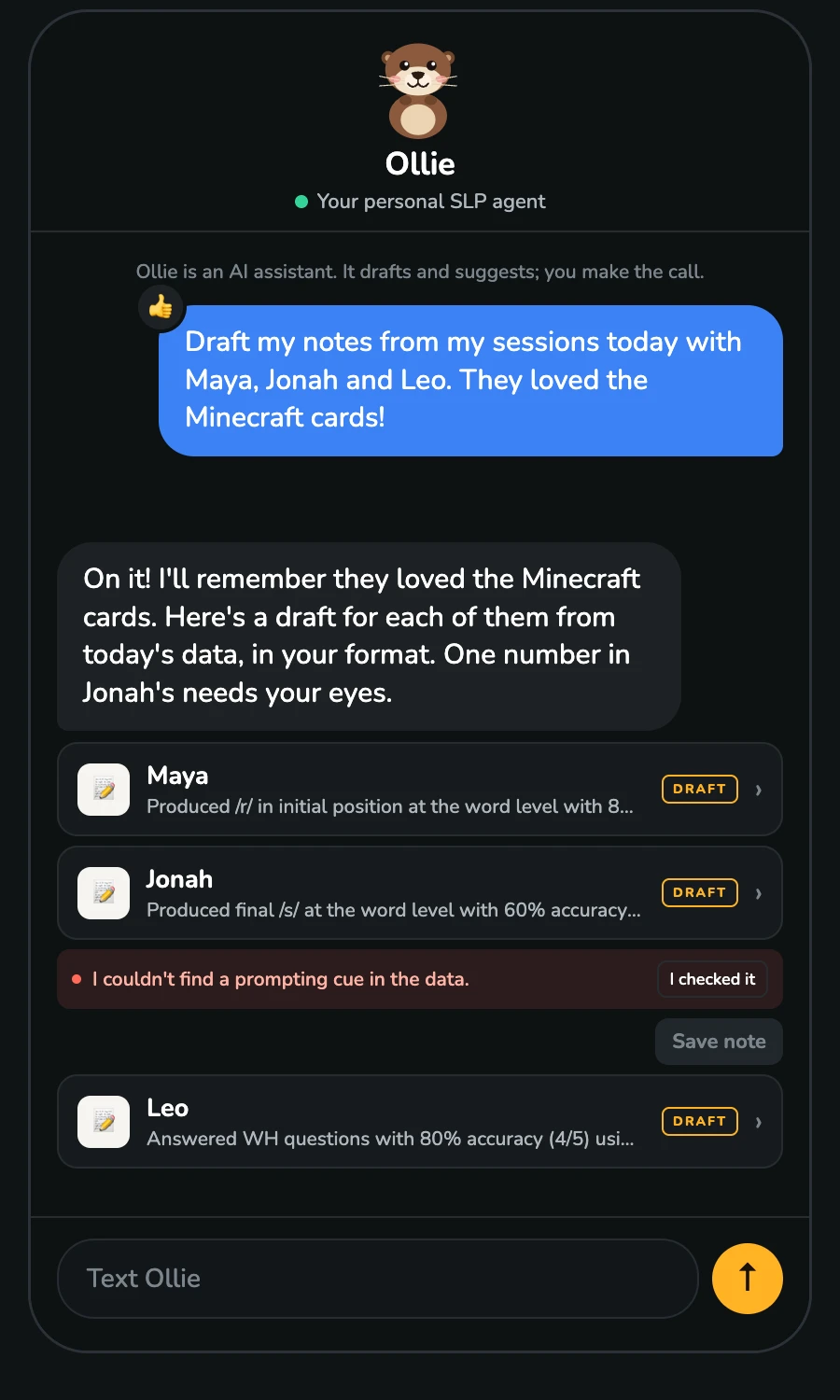
Ollie is an AI assistant. He drafts and suggests; you make the call.
You review, edit, and sign off
Every AI output arrives labeled as a draft, and nothing is ever saved or sent on your behalf. You read it, change what you want, and approve it — your clinical judgment has the final word, every time. That is the whole point: the app does the typing, not the thinking.

What you never do
- Re-type trial data into a separate system after school
- Build a progress graph by hand from tally marks
- Start a SOAP note from a blank page at 6 pm
- Hand a client’s name to an AI
Give yourself the therapy time back.
Set up your caseload tonight. Walk into tomorrow's first session ready.
7-day free trial · Cancel anytime · AI never sees client names